Stories
12:46, Sun , 30 March 2025
As a car rental business owner, I often get questions from customers about which navigation app to use during their trip. Whether they are locals renting a car for a short-term need or tourists exploring unfamiliar roads, a reliable navigation app is essential.
The two most popular options are Google Maps and Waze. Many of my customers switch between the two, depending on their needs and driving style. However, based on years of fleet management experience and feedback from countless drivers, I have insights into which app works best in different situations.
Rather than a traditional feature-by-feature comparison, I want to share practical user experiences with both apps. Here’s what rental car drivers should consider before choosing between Google Maps and Waze.
User Interface and Ease of Use
When renting a car, the last thing you want is to struggle with a complicated app while navigating unfamiliar roads. A clean and intuitive interface makes a huge difference, especially for drivers already adapting to a new vehicle.
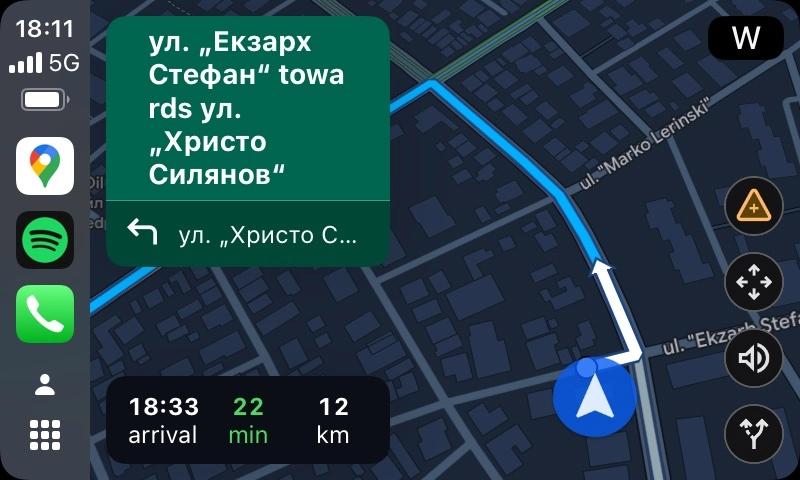
Google Maps is the clear winner here. Its interface is easy to understand, with clear directions, a well-structured map, and a simple layout that minimizes distractions. The app looks even better on larger screens, such as those in rental cars equipped with Apple CarPlay or Android Auto.
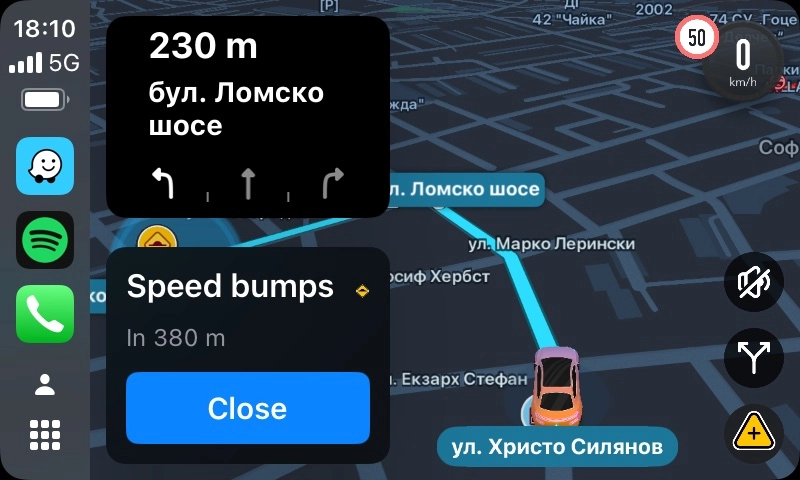
Waze, on the other hand, has a more playful and colorful interface that some find cluttered. While the app provides useful real-time traffic reports, it can feel overloaded with information. Rental car customers often don’t want to spend time adjusting the interface to make it more user-friendly.
Navigation Experience
Most rental car customers just want to get from point A to point B as efficiently as possible. The best navigation app should provide clear, simple, and non-intrusive directions.
Google Maps offers a straightforward navigation experience. It provides clear voice directions without overwhelming the driver with excessive notifications. It also integrates seamlessly with in-car infotainment systems, ensuring a smooth experience whether using voice commands or following the map.
Waze, however, delivers more real-time traffic updates and road condition alerts. This is great for avoiding traffic jams, but it can sometimes feel intrusive. Some customers report feeling overwhelmed by too much information, making it harder to focus on the road.
Reliability and Bugs
The last thing a rental car customer wants is for their navigation app to stop working in an unfamiliar city.
Unfortunately, neither Google Maps nor Waze is perfect. Both apps can have bugs, especially when used with Apple CarPlay and Android Auto. In my experience, customers have reported occasional issues such as lost GPS signals, delayed rerouting, or unexpected app crashes.
However, Google Maps is generally more stable and reliable. Waze users sometimes encounter unexpected glitches, and because the app relies entirely on an internet connection, it can struggle in areas with weak signals.
Offline Navigation and Connectivity
For tourists renting a car in a foreign country or a remote area, offline navigation can be a lifesaver. This is a major advantage of Google Maps, as it allows users to download maps for offline use. This ensures that they can still find their way even if they lose mobile connectivity.
Waze does not have a true offline mode. While it can continue guiding the driver along a pre-set route, it cannot reroute if the internet connection is lost. This can be frustrating for customers driving in remote areas or regions with unstable mobile networks.
Update Frequency and Support
From a business perspective, I always recommend apps that receive frequent updates and bug fixes. No one wants to rely on outdated software that may not function properly.
Google Maps receives updates more frequently than Waze, with regular fixes for both iPhone and Android users. Waze, in comparison, updates more slowly, sometimes taking months to fix known issues. Customers using Waze occasionally report annoying bugs that remain unresolved for too long.
Conclusion: Which App Should Rental Car Customers Use?
For most of my car rental customers, Google Maps is the best choice. It offers a clean and easy-to-read interface, stable performance, offline maps, and fewer distractions. It’s the ideal option for tourists, business travelers, and anyone looking for a hassle-free navigation experience.
Waze remains a great option for drivers who prioritize real-time traffic updates and road alerts. If avoiding traffic jams is the top priority, Waze can be useful—but it requires an internet connection and may feel intrusive for some users.
Ultimately, the choice comes down to personal preference. If you’re renting a car from us and need a recommendation, we suggest starting with Google Maps for the best overall experience.
Drive safely!